



Form fields
Add as many fields as you need using different field types: text fields, dropdown lists, checkboxes, and more.


 Landing page for your event
Create your own unique hall
Sale of lots on the development plan
Examples and templates
Free and with no redirects
Event catalog for your website
Manage requests easily and clearly
Timing, speakers, voting
Landing page for your event
Create your own unique hall
Sale of lots on the development plan
Examples and templates
Free and with no redirects
Event catalog for your website
Manage requests easily and clearly
Timing, speakers, voting
An online participant registration form that event organizers can customize to fit their needs and style. Any fields, your own design, and registrations instantly sent to your CRM.
Manually collecting registrations wastes your team's time, leads to lost participants, and exposes organizers to fines for violating personal data processing regulations.
Every event registration challenge is solved through configuration-not by hiring a developer.
If you collect participants' names, email addresses, and phone numbers through a spreadsheet or email, you are processing personal data without a legal basis. EU regulators can impose fines of up to €20 million or 4% of a company's annual global turnover.
With RegToEVENT, consent to process personal data is requested explicitly: a separate checkbox, clear wording, and a link to your privacy policy are included in the form. The participant's consent is stored together with their registration.
With RegToEVENT, organizers of any type of event can create and customize participant registration forms on their own. It can be a simple form with just three fields-name, email, and phone number-or you can add as many custom fields as you need: company, job title, occupation, how participants heard about you, or anything else you want to learn about your attendees.
Add as many fields as you need using different field types: text fields, dropdown lists, checkboxes, and more.

Make fields required or optional. Create separate registration forms for different ticket types.

Choose the form background and customize the colors of form elements. Take advantage of flexible participant data collection settings.
Many event organizers don't realize that a registration form doesn't have to be one long page. Break it into steps: one screen, one question, and participants are far more likely to complete the form instead of closing the tab halfway through.
Conditional logic makes your form smart: each next question depends on the previous answer. Guests requesting a special dietary menu will be asked which one, while everyone else won't even see that question.
Your participants will complete the process just as easily. You'll see their registration on the Kanban board with its status and all submitted answers.
Not an e-commerce system adapted for events, but a CRM for tickets and registrations designed around the organizer's workflow-from the first registration to check-in at the entrance.
Participants complete the form on your website or via a direct link
The registration appears on the board with its status and responses
The participant automatically receives a QR code ticket
Scan QR codes at the entrance and print badges
Inside each participant's profile you'll find everything: form responses, ticket type, payment status, emails and SMS, and check-in records. Your team works from one place instead of exchanging spreadsheets.
Organizers decide which form fields are required and which participants can fill in or skip. For example, you may ask for the participant's company while knowing that some attendees will be freelancers.
Ask in-person attendees whether they need parking, a transfer, what meal they prefer, or what T-shirt size they want as a gift. There's no need to collect this information from people who purchase online access to the live stream.
Organizers choose the order of questions in the registration form. Want to ask for the country before the name? Or place the promo code field first? That's perfectly possible.
Speed up form completion by adding questions with predefined answer options. Questions such as "What is your occupation?" or "What is your job title?" can be displayed as checkboxes, dropdowns, or radio buttons, allowing participants to simply choose an option.
Creating a personalized menu or compiling a list of guests who need a hotel? If a participant indicates they require a special diet, you can ask which one. If not, they move straight to the next question. This makes the form faster to complete and avoids asking irrelevant questions.
Choose whether to allow duplicate contacts, enable autofill for entertainment events, collect information for each participant at business networking events, support multiple ticket purchases, generate invoices, and much more to match your registration workflow.
Choose a background image for the form from the built-in library or upload your own. Customize the colors of form elements and text to match your event branding.
Choose from 12 registration form formats to integrate with your website or use via a direct link: ticket widget, two-step form, web form, mini event page, and more. Plus, you can create a complete event landing page using the built-in free website builder.
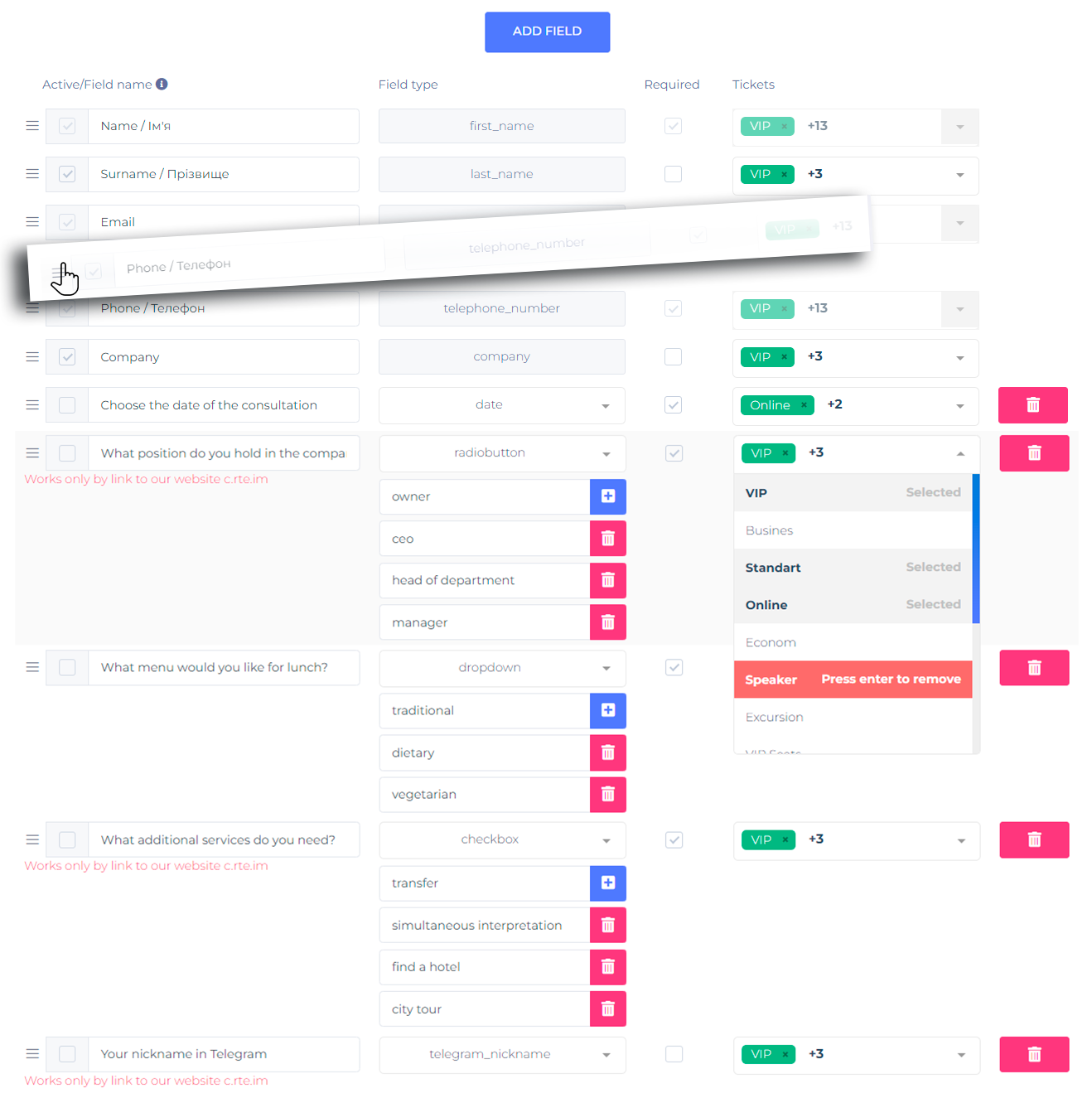


The intuitive interface lets you create a registration form quickly without involving technical specialists.
Customize the form to match your event's specific needs or even individual ticket categories, depending on the information you need to collect.
Use your own visual elements to match your event branding and choose the form layout that works best for your audience.
You can update form fields and settings at any time. Changes take effect instantly without changing the form link or embed code.

Watch this short video covering everything from creating fields to publishing your participant registration form.
RegToEVENT registration forms cover the most common event organizer scenarios. Choose the one that fits your needs.
A no-code form builder: choose your fields, enable personal data consent, and publish your registration link. It takes about 15 minutes to get started.
Start for freeReplace spreadsheets and manual processing with automatic QR code tickets, registration statuses, duplicate protection, and participant email campaigns.
Compare with Google FormsMulti-step forms and conditional logic improve registration conversion by showing participants only the questions that apply to them.
See an exampleAccept online payments directly in the form: participants register, pay, and instantly receive a ticket with a unique QR code by email.
QR code ticketsKeep all registrations in one system: Kanban board, statuses, contact history, data export, and sales source analytics.
CRM for tickets and registrationsEverything event organizers ask before launching online participant registration.
Create a registration form for your event in just 15 minutes: custom fields, GDPR consent, QR code tickets, and every registration automatically stored in your CRM.
Create a form for free