



Sell stands
while you sleep
The interactive exhibition plan shows what is available and what is sold. The exhibitor picks a stand and pays online.
And now the familiar picture, the other way round
Requests in messengers, notes on scraps of paper and the question «is this stand still free?» that you answer manually twenty times a day. Handling, approving and selling stands by hand eats up more of your team's resources than it seems at the start.
- Your team's time. A manager repeats the same answer about which space is taken.
- Lost sales. A partner does not understand the layout, compares options and «goes away to think».
- Double bookings. Two managers sold the same stand because the spreadsheet updated too late.
- Lost leads. A request stayed buried in a chat and was remembered only after sales had closed.
Where requests for exhibition space come from today
One person keeping all of it in their head
Answering manually every time, checking the spreadsheet and hoping nobody sold that spot twice.
What exactly changes once Expo Planner is live
On the left - what selling exhibition space looks like by hand. On the right - the same job inside the platform.
«Is this stand still free?»
The manager checks the spreadsheet, messages a colleague, replies an hour later. By then the client has cooled off.
The status is visible on the plan
The buyer opens the interactive expo map themselves and sees available, reserved and sold space in real time.
A PDF layout goes stale in a day
After a re-layout, half your partners are holding an old version of the hall plan.
A single source of truth
You change the plan in the builder and everyone sees the current layout at the same link.
Selling 500 stands by hand
Every stand means an email thread, an approval, a manual invoice. There are not enough managers to go round.
Self-service
The exhibitor fills in the form, picks the options and pays online or generates an invoice for bank transfer.
Requests get lost across channels
Some in Telegram, some in email, some in a notebook. Who is at which stage - nobody knows.
A kanban of requests in the CRM
Every stand request is a card with a stage, a history and a contact. The manager sees where each one is stuck.
The partner cannot see what they are buying
A written description answers none of the key questions: where do I stand, who is next to me, what traffic passes by.
A visual choice
The partner sees the shape and size of the space, the neighbours, the distance to the entrance and the stage. The decision comes faster.
Two scenarios for different sales setups
You already have a partner deck and an event website. On the website you place the request form for exhibition space, and on a slide of the deck - the exhibition plan with a «see current information» button. Then you choose one of the two modes.
Showcase
An interactive map where tapping a stand opens all the information about it. There are no direct automated sales: you keep dealing with each partner individually.
- A stand map with descriptions, contacts and exhibitor categories
- Data is pulled into the networking app automatically
- Participants see space availability in real time: who has already bought, what is free, which competitors are nearby
- The page can also carry regular ticket sales, a stand request form and a manager contact
Automated
Suited to those who need to sell not five stands but 500, and simply do not have enough managers for it. The buyer goes from choosing the space to paying entirely on their own.
- An exhibition plan builder with stand types by area, price and features
- Add-on options for every type: furniture, a flat-screen display, a power socket, decor, lighting
- A flexible request form and a payment page: online or an invoice for bank transfer
- Manual review of requests where individual approval is needed
- A paid stand is marked as taken on the plan straight away
Launch in four steps
The exhibition plan builder needs no designer, no graphics software and no developer. The organiser puts the expo layout together themselves.
Upload a background and create zones
Halls, sectors, service areas, entrances and exits, catering points. A technical floor plan, a venue diagram or a render will do.
Add stands and numbers
Manual mode or templates and auto-layout. Set sizes, aisles, stand types and add-on options.
Connect the form and payment
A flexible exhibitor form, online payment or an invoice for bank transfer and, if needed, manual approval.
Publish the map
Embed the widget on the exhibition website and in the app. Everyone sees updates instantly, with no new PDFs to send round.
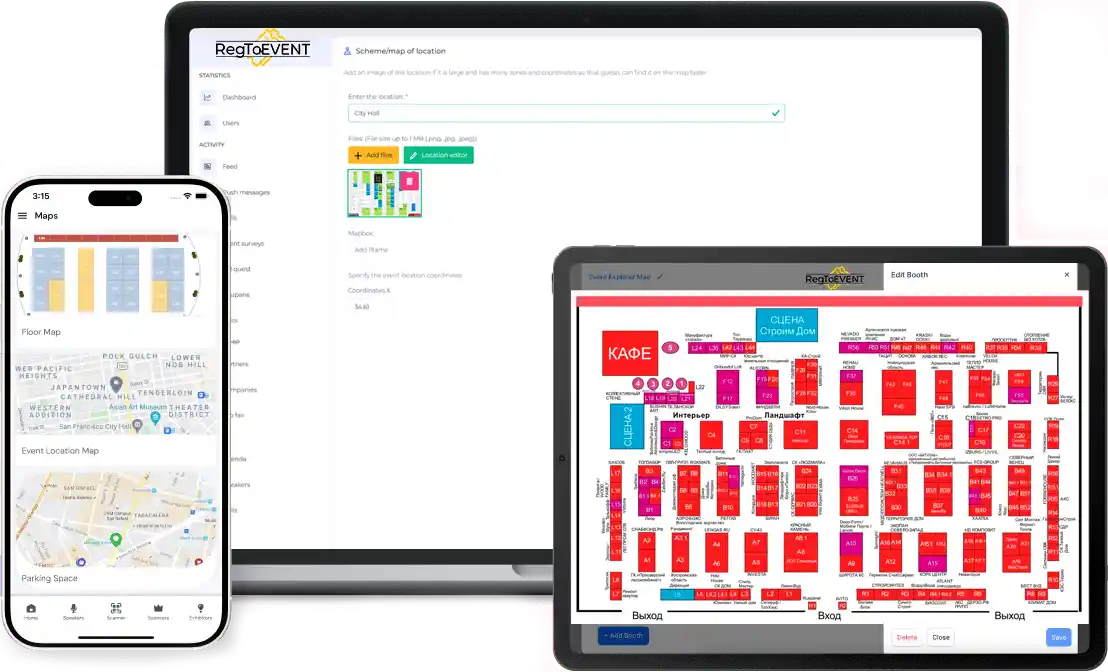
Stands sync with the participant catalogue, and the plan can be zoomed and panned.
How an exhibitor buys a stand without you
Someone who already knows exactly what they want can pay you even at three in the morning without taking a single minute of your time.
Get a demoOpens the exhibition plan
From the event website, from the partner deck or from a link sent by your manager.
Sees what is available
The shape and size of the space, the stand number, the neighbours, the distance to the entrance and the stage, the status in real time.
Builds a turnkey stand
Adds furniture, a flat-screen display, an extra power socket, decor, lighting - everything you have set up as options.
Fills in the form
Your flexible request form with exactly the fields you need about the company and its representative.
Pays
Online card payment or an invoice generated for bank transfer for the accounts department.
The stand becomes taken
On the exhibition plan the space is marked as sold straight away. Nobody else lays claim to it.
Not a single request gets lost
If individual approval is needed, switch on manual review of requests. Managers contact the client straight from the CRM, discuss the details and send a payment link or an invoice. The built-in kanban shows which stage each client is at.
The exhibitor form with the chosen stand and options enters the pipeline automatically.
You check the company, its category and its fit with the exhibition concept.
A link for online payment or an invoice for bank transfer.
The stand is closed off on the plan and the partner receives a confirmation.
The data goes to the app, the participant catalogue and the build-up checklist.
The features exhibitions actually need
A custom hall background, stand synchronisation, zoom and pan, real-time updates.
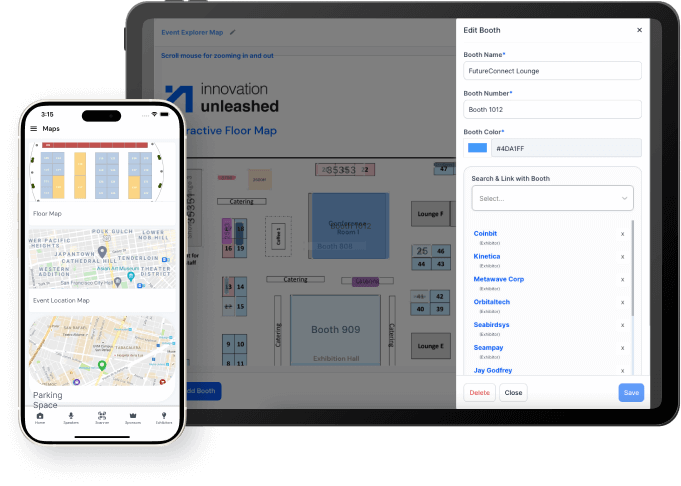
An interactive stand map
Tapping a stand opens the exhibitor card: description, contacts, categories, links. It is the very same tool your sales team and your visitors both see.
Any hall background
Support for your own background image: a technical floor plan, a venue diagram, a build-up render.
Auto-layout and templates
Create stand grids and sections quickly. It speeds up the start and saves designer time.
Updates on the fly
You change the plan and participants immediately see the current version, with no PDFs to forward.
Search and filters
Search by stand number, company name, category or hall sector. A visitor finds the exhibitor they need in seconds.
Comfortable on mobile
Pan, zoom and tap - just like ordinary maps. Perfect for visitors right there at the venue.
Stand availability control for your sales team
- Statuses: available, option, reserved, sold, unavailable.
- Layers and zones: halls, sectors, themed clusters.
- Links to requests: jump quickly from a stand to the deal and the contact.
- Consistent rules: fewer mistakes when relocating or merging stands.
Transparency speeds up sales. It is enough to send a partner a link to the current map, where they will immediately see the location, the shape and size of the space and who their neighbours will be. Being able to size up the surroundings instantly - and to see there are no direct competitors next door - builds trust in the organiser.
What each side gets
The organiser
- Control of statuses and exhibition space sales in one place
- A minimum of manual edits and repeated answers
- A single map for the team, the contractor and the partners
- Less operational noise on event day
The exhibitor
Understands the location and the traffic, shows the stand to visitors and gains more contacts thanks to search and transparent placement.
The visitor
Finds companies and landmarks quickly, plans a «what to see» route and wastes less time at the venue. That directly raises satisfaction with the exhibition.
Who Expo Planner is for
Especially useful where there are many stands, several halls and a need to keep the layout up to date.
Exhibitions and expos
Halls, clusters, large floor areas, a great many exhibitors and contractors.
Conferences with an expo area
Partner stands, sponsorship packages, navigation between zones and halls.
Fairs and festivals
Sales points, food court, activities, entrances and exits, crowd flow management.
Multi-venue events
Several halls, floors, different visit scenarios and a separate plan for each.
Stand not sold - you pay nothing
The showcase module is free for RegToEVENT clients. The automated scenario costs the standard ticket commission, which is charged only on exhibition space actually sold.
Five questions people come to us with
How to sell exhibition stands online without managers
Create the exhibition plan in the builder, define stand types and add-on options, connect a flexible request form and online payment. The buyer chooses the space and pays on their own, and a sold stand is closed off on the plan automatically. A manager steps in only where individual approval is required.
How to make an interactive exhibition plan instead of a PDF layout
Upload a hall background (a technical floor plan, a venue diagram or a render), place the stands manually or with auto-layout, and label the numbers and zones. The map is published as an embedded widget on the event website and updates in real time, so your partners will never again be holding an outdated layout.
How much automating exhibition space sales costs
The showcase mode with an interactive expo map is free for RegToEVENT clients. Automated stand sales are charged at the standard ticket commission: if a stand does not sell, you pay nothing. There is no fee for launch, for the number of stands or for setup.
How not to lose exhibitor requests and to see every client's stage
All requests for exhibition space land in the RegToEVENT CRM with its built-in kanban. Every form becomes a card with the chosen stand, the options, the contacts and the history of the conversation. From that same card the manager sends a payment link or generates an invoice for bank transfer.
How to show a partner who their stand neighbours will be
Send a link to the current stand map. The partner will see the location, the shape and size of the space, the occupied spots nearby and the categories of their neighbours. If the event uses a networking app, the data is pulled into it automatically and all participants see space availability in real time.
Request an Expo Planner demo
Leave your contact details and we will show you how to put together an interactive hall plan, link stands to exhibitors, set up options and embed the map on your exhibition website.
- A demo on your own real floor layout
- A scenario costed for your number of stands
- A reply within one business day
Prefer a messenger? Write to us on Telegram
Frequently asked questions
What is Expo Planner and what does it give an exhibition organiser?
Expo Planner is a builder for an interactive venue map that lets you create a digital hall plan with stands, numbers, statuses and exhibitor cards. The organiser gets a single source of truth for the team, the partners and the visitors, plus a tool for selling exhibition space.
Why is an interactive map better than a PDF or a printed layout?
An interactive map updates in real time. PDFs and print do not pick up changes, which leads to outdated versions of the plan and confusion at the venue. On top of that, an interactive plan shows stand availability statuses and supports search, zoom and jumping to an exhibitor card.
How much does Expo Planner cost?
The showcase module with an interactive expo map is free for RegToEVENT clients. The automated scenario with online stand sales is charged at the standard ticket commission. If a stand does not sell, you pay nothing.
What is included in the free showcase mode?
An interactive map where tapping a stand opens all the information about it, synchronisation with the networking app, a regular ticket sales block, a form for stand requests and a link to your manager's contact. There are no direct automated sales in this mode.
How quickly can an exhibition plan be launched?
Organisers usually put together the basic layout with a background, zones and stands in one working day. After that come stand types, options, the request form and payment. No developer or designer is needed for launch.
Do you need design skills or graphics software?
No. The builder is intuitive: you upload a background, place stands manually or with auto-layout, and adjust labels, colours and shapes. Complex graphics editors and static PDFs are no longer needed.
Can you upload your own hall background?
Yes. A custom background image is supported: a technical floor plan, a venue diagram, a build-up render or any other base. On top of it you place an unlimited number of stands and zones.
How do you set up stand types with different areas and prices?
In the builder you create stand types that differ by area, price or other features: in-line, corner, island, premium by the entrance. Every stand on the plan is tied to its type, so prices and rules are applied automatically.
Can you sell add-on options with a stand?
Yes. Options can be attached to every stand type: furniture, a flat-screen display, an extra power socket, decor, lighting and more. The partner puts together a turnkey package right while submitting the request, and you earn extra revenue from the stand.
What payment methods are available to an exhibitor?
Online card payment on the payment page, or an invoice generated for bank transfer for the exhibiting company's accounts department. Both scenarios are available within a single checkout flow.
Can an invoice for bank transfer be generated?
Yes. The invoice can be generated by the exhibitor themselves on the payment page, or by your manager from the client card in the CRM once the details are agreed.
What if a request needs individual approval?
Switch on manual review of requests. The request will wait for your confirmation, and managers will contact the client straight from the CRM, discuss the details and send a link for online payment or generate an invoice.
How do you avoid losing a request and see every client's stage?
All requests land in the built-in kanban. Every request is a card with the chosen stand, the options, the contacts and the history. You see which stage each potential exhibitor is at, and no enquiry is left unanswered.
What happens to a stand right after payment?
As soon as a stand is paid for, it is marked as taken on the exhibition plan straight away. Nobody else will lay claim to a spot someone has already booked.
Are double bookings of the same stand possible?
The status changes centrally and appears on the map instantly across every channel: on the website, in the deck and in the app. That removes the situation where two managers sold the same space from an outdated spreadsheet.
Can the map be embedded on the exhibition website?
Yes. The map is embedded as a widget on the event website so that visitors and potential partners open it in one click. Role-based access and cloud-based work are also supported.
Does the plan sync with the networking app?
Yes. If your conference uses a networking app, the data is pulled into it automatically. All participants see stand availability in real time: who has already bought, which spaces are free, which competitors are nearby. At hybrid events, online participants visit virtual stands, view presentations and put questions to exhibitors in the chat.
Is there search and filtering by stand?
Yes. Search works by stand number, company name, category or hall sector. It cuts the time a visitor spends looking for the exhibitor they need and increases footfall to your partners' stands.
Can the plan be changed while sales are running?
Yes. Relocations, stand mergers and changes to the aisles are made on the plan, and everyone immediately sees the current version. The layout can be changed even on opening day.
Does the solution suit several halls, floors and venues?
Yes. You can create separate plans for halls, floors and venues, and mark entrances, exits, sanitary areas, cafes, charging points and service points. That is critical for large venues with a great many participants.
Did not find an answer?
Describe your venue and the number of stands - we will suggest the best scenario.